Find OVR Listings on the PCA Mart
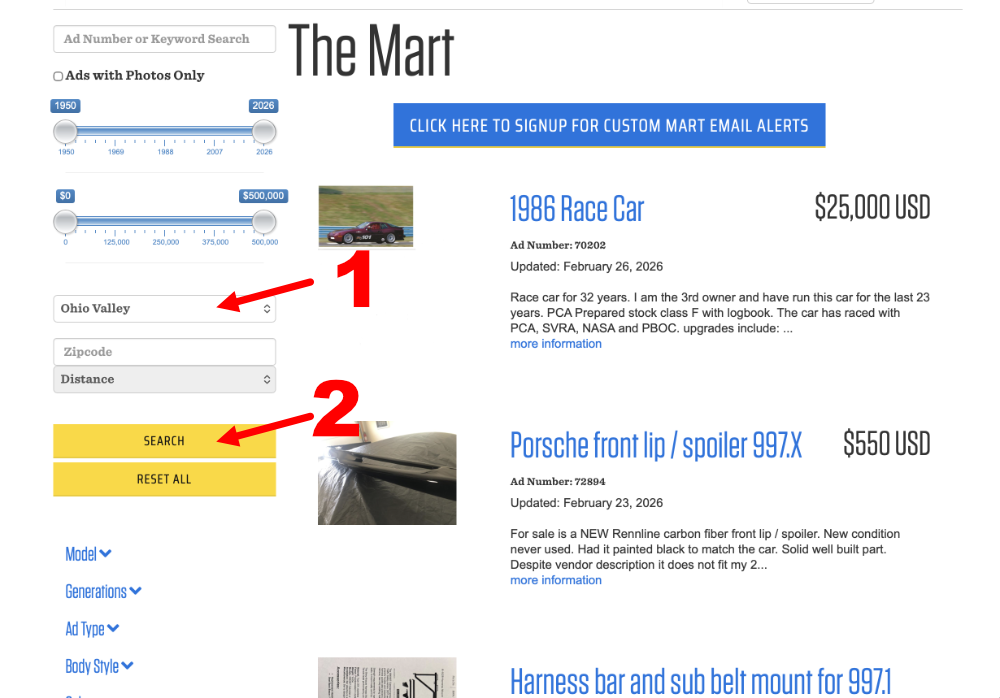
Did you know the national PCA Mart has a filter to show listings just from our Ohio Valley Region members? It's a great way to find cars, parts, and more close to home. Here's how:
Visit the PCA Mart — Head to mart.pca.org in your browser.
Find the Filters panel — On the left side of the page, you'll see filter options including Sort By, Region, Model, and more.
Select Ohio Valley — Scroll to the Region dropdown and choose "Ohio Valley" from the list.
Hit Search — Click the Search button to apply the filter.
Browse OVR listings — You'll now see all current listings posted by your fellow OVR members!